Match first. No, pay off the credit card first. Roth is always better. Traditional is always better. Max out the HSA. Build six months of cash before you invest a dime. If you have spent any time around personal finance advice, you have probably been handed a confident list of where your money should go and in what order, and the next person you asked probably handed you a different one.
The truth is that the right mix depends on your income, your tax bracket, your plan's rules, your debts, and what you want your money to do for you. So instead of giving you one more list, we built a tool that lets you try your own and see how your choices change your future. It is called the Contribution Planner, and you will find it on the Investments page.
Every Account Type, Side by Side
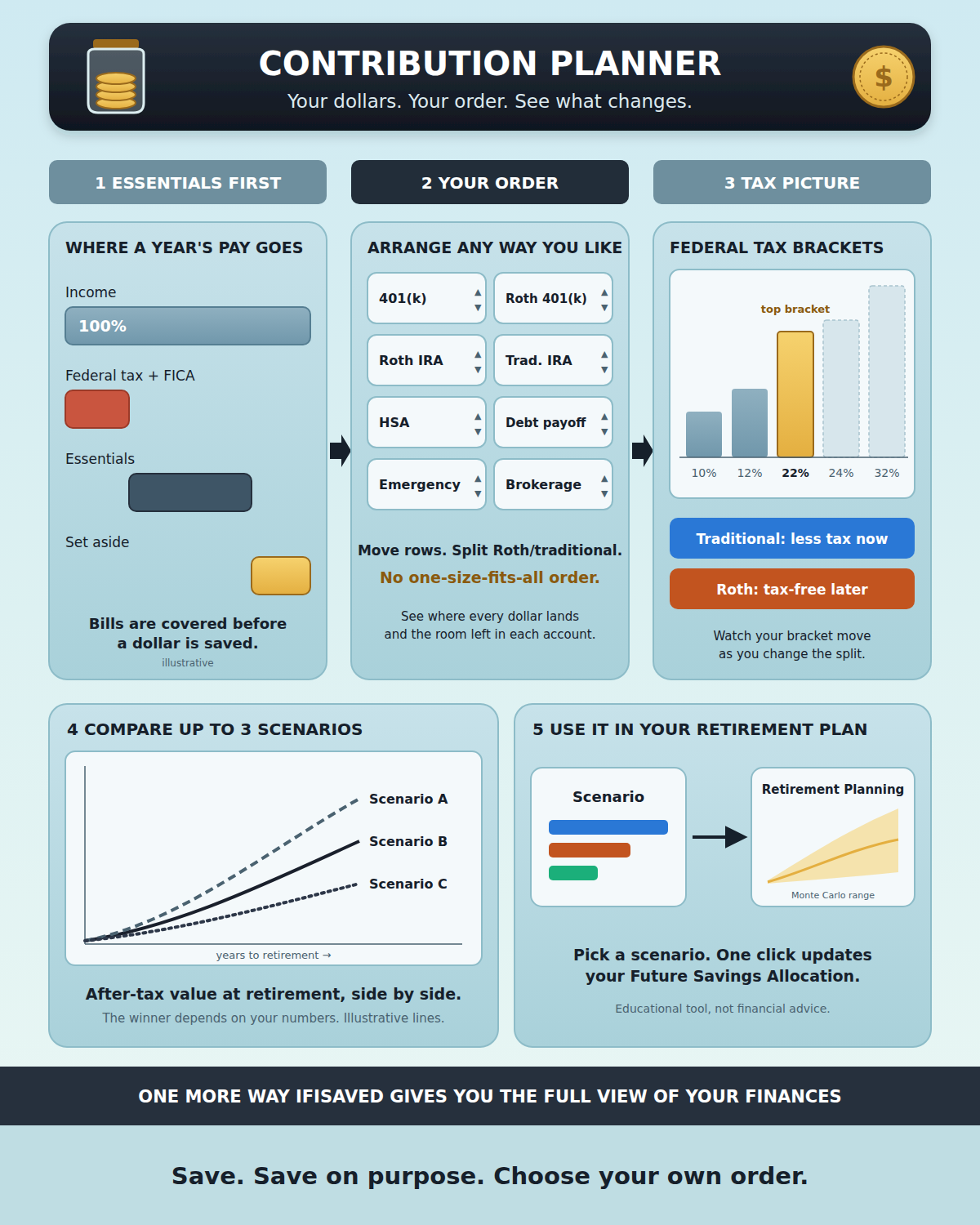
The planner lays out the places a savings dollar can go as rows you can turn on, turn off, and rearrange:
- 401(k)/403(b) up to your employer match, with the match added on top. It doesn't come out of your budget.
- 401(k)/403(b) beyond the match, up to the yearly employee limit.
- Roth 401(k) or traditional 401(k), with a slider to split any workplace row between the two, and a choice to take the match as Roth if your plan allows it.
- Roth IRA and Traditional IRA, which share one yearly limit. You can also model a backdoor Roth.
- Health Savings Account (HSA), if you have a high-deductible health plan.
- High-interest debt payoff: extra payments on top of your minimums.
- Emergency fund and short-term savings goals, like a car, a down payment, or travel.
- Governmental 457(b) and after-tax 401(k) (the "mega backdoor Roth"), for people whose plans offer them.
- Taxable brokerage account: no limit and no deduction, but no restrictions on when you can use it.
The page opens with a starting arrangement so you have something to look at. That arrangement is not a recommendation. It is just a first draft for you to change.
How the Page Works
- Essentials come first. Before any dollar is saved, the planner counts what you need to live on: housing, food, utilities, transportation, insurance, and minimum debt payments. It pulls your monthly expenses from your budgets if you have them. By default, the amount you set aside is everything left after federal tax, Social Security and Medicare, and your essentials. You can type a set amount instead. If a plan would leave you short on essentials, the page tells you in red. A plan you can't keep up with isn't a plan.
- Fill in your details. Your income, age, filing status, employer match, health plan, and which features your workplace plan offers. If you have used Retirement Planning, the planner fills these in for you. Your debts come from the Emergency & Debt page and your emergency fund goal from your savings goals. Changing a number here doesn't change those pages.
- Arrange your order. Dollars fill each row from top to bottom, up to that row's limit or an amount you choose, until your yearly amount runs out. Move rows with the arrows, switch them off, or add the ones you need. Each row shows how much lands there and how much room is left for the year.
- Read the tax picture. The planner estimates your federal taxable income, your tax, and the top bracket you reach. It shows how much your pre-tax contributions lower your tax and how much more it would take to drop into the bracket below. Move a dollar from Roth to traditional and you see the difference right away.
- Compare scenarios. Save the current plan, then change the order or the Roth/traditional split and save again. One click creates "same plan, all Roth" and "same plan, all traditional" versions. Up to three saved scenarios appear next to your current plan, with charts for where this year's dollars go, what each version could be worth after tax at retirement, and the federal taxes paid while working versus at withdrawal.
- Send it to Retirement Planning. When a scenario reflects how you actually plan to save, one button sets the Future Savings Allocation on your Retirement Planning page to match, so your Monte Carlo projections use it.
Questions It Helps You Answer
Roth or traditional? Traditional dollars lower your taxable income now and are taxed when you take them out. Roth dollars are taxed now and come out tax-free later. Which one leaves you with more depends on your tax rate today versus in retirement, and nobody knows that for certain. The planner's Roth vs. traditional chart shows what you keep after tax under each choice, and a separate chart shows how the result shifts as your retirement tax rate changes. You can see how sensitive your decision is to that one unknown.
Pay down debt or invest? When there is money in the debt row, the planner shows roughly how much interest your extra payments avoid each year. Paying off debt at a given APR works like a guaranteed, tax-free return at that rate. The debt vs. investing chart tracks your net worth over time under each choice. Once a debt is paid off, the money that went to it moves down to the next rows in your order.
How much room do I have? The page uses the 2026 federal limits: $24,500 for 401(k)/403(b) employee contributions (plus catch-up from age 50, and a larger one at ages 60–63), $7,500 for IRAs combined, and $4,400 self-only or $8,750 family for HSAs. It also checks the income ranges where Roth IRA contributions and traditional IRA deductions phase out, and adds a note when one applies to you.
Save, and Save on Purpose
This tool can only rearrange money you are actually setting aside, so the first and biggest step is still the same: save something, and keep doing it. Every account on this page grows only if money goes into it, and time does most of the work.
The second step is to save on purpose. Each account comes with its own deal: a tax break now or later, a match, a limit, rules about when you can use the money. The places that are right for you are the ones whose trade-offs you understand and have chosen for your own goals, not the ones someone told you to use because they work for most people. Build a few scenarios, look at the numbers, and pick the plan you can stick with.
Open the Investments page and choose Contribution Planner to try it with your own numbers.
As this is a new feature on the site, as always, if you have any suggestions for improvements, please send a note in using our contact us link in secondary nav bar.
The Contribution Planner is an educational tool, not financial, tax, or investment advice. It estimates federal income tax only (no state or local taxes, credits, or itemized deductions) and uses limits entered by IfISaved, which change every year. Your plan's rules can differ, so check with your plan administrator, and consider talking with a qualified tax or financial professional about your situation.