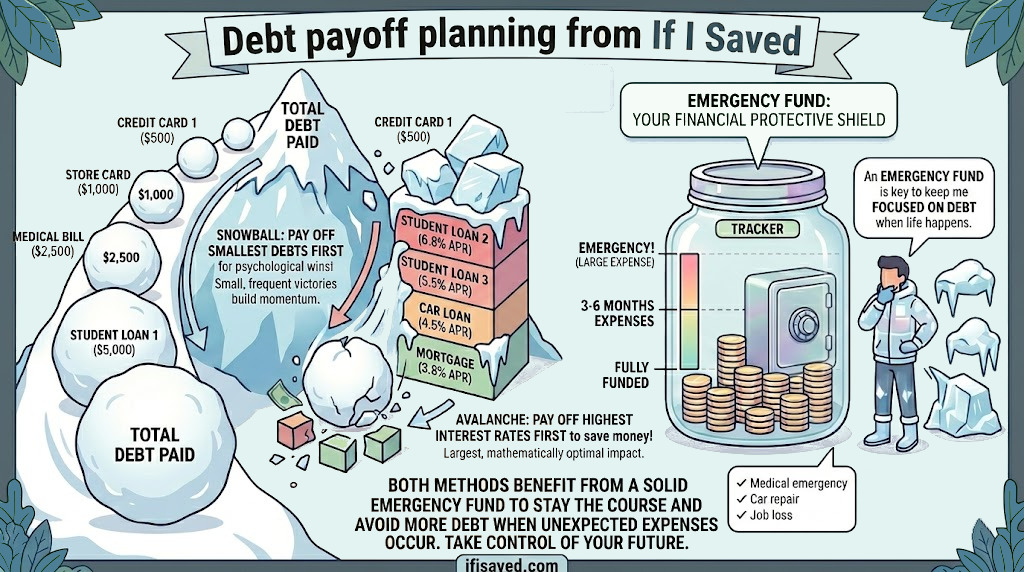
We are excited to announce a brand-new section on IfISaved: the Debt page. This tool brings together two of the most impactful steps in any solid financial plan — building a cash cushion and eliminating high-interest debt — in one easy-to-use place.
Why These Two Goals Go Together
Dave Ramsey calls it Baby Step 1 for a reason: before you attack debt aggressively, you need a small emergency fund. Without one, any unexpected expense — a car repair, a medical bill, a broken appliance — sends you right back to the credit card. The new Debt page is designed around this sequence: build a starter fund first, then pour everything you can into eliminating debt.
Emergency Fund Tracker
The Emergency Fund tab lets you set a savings goal (the classic starting target is $1,000) and link one or more of your connected bank accounts to it. Once linked, IfISaved pulls the live balances from those accounts and shows you exactly how close you are to your target with a progress bar and percentage.
A common piece of advice is to keep your emergency fund in a dedicated savings sub-account — separate from the money you spend day-to-day. Most banks let you open a free secondary savings account and label it anything you want. Connect that account to IfISaved, then link it to your Emergency Fund goal, and your progress will always be up to date without any manual entry.
Debt Overview
The Debts tab automatically pulls in your linked loan and credit card accounts (mortgages are excluded so they don't clutter the picture). For each debt you can see:
- The current balance owed
- The listed APR from your account data
- A payoff timeline estimate based on your monthly payment and interest rate
You can enter or adjust the monthly payment and APR for each debt directly on the card. The payoff estimate updates instantly so you can see the real cost of carrying each balance.
Debt Payoff Planner — Avalanche vs. Snowball
The Payoff Plan tab is where the real math happens. Two popular debt payoff strategies are supported:
- Avalanche — Pay the highest-APR debt first. This approach minimizes the total interest you pay over time and is mathematically optimal.
- Snowball — Pay the smallest balance first. You pay off accounts faster in terms of count, which builds psychological momentum and can help keep you motivated.
Enter the amount of extra money you can put toward debt each month — even $50 or $100 makes a meaningful difference — and the planner shows you the focused payoff order and how many months each debt will take to eliminate. The plan is saved automatically so it is waiting for you every time you return to the page.
The Connection to Your Budget
One of the best ways to find extra debt-payoff money is to build a budget. The Budget Planner on IfISaved can help you identify spending categories where you have room to cut and redirect those dollars toward your highest-interest debt. The Debt page links directly to the Budget Planner for this reason — the two tools work best together.
Getting Started
- Make sure your accounts are connected on the Accounts page.
- Open Debt in the navigation bar.
- On the Emergency Fund tab, set your target (start with $1,000) and select the account you are building it in.
- Head to the Debts tab and confirm the payment and APR for each debt.
- Open the Payoff Plan tab, pick your strategy, enter your extra monthly amount, and hit Calculate Plan.
That's it. You will have a clear picture of where you stand and a concrete plan for getting out of debt. Good luck!